New Google Earth 4.3 Released

Yesterday Google released an updated version of Google Earth for PC, Mac or Linux.
Google Earth blog has posted a video highlighting some of the new features, which include:
Day/Night mode showing the local time sunrise and sunset.
Street Views in Google Earth.
Photography dates (finally! Although, sadly not for all imagery).
Faster loading 3D models.
Flash support on Mac.


Download Google Earth 4.3

Get Ready for Water-Powered Cell Phones

"Samsung Electro-Mechanics has developed a micro-fuel cell and hydrogen generator that runs on water, writes the Chosun Ilbo. Oh Yong-soo, vice president of Samsung Electro-Mechanics' research centre, who said that when the handset is turned on, metal and water in the phone react to produce hydrogen gas. The gas is then supplied to the fuel cell where it reacts with oxygen in the air to generate power. Other fuel cells need methanol to produce hydrogen, while Samsung's needs only water. Since the micro-fuel cell can generate up to three watts of electricity, it could be used in mobile devices. The new fuel cell could power a handset for ten hours, twice as long as rechargeable batteries. Oh Yong-soo said water-powered handsets are expected to hit the market by 2010."


I've always been a bit of a skeptic. This is one of those "I'll believe it when I see it" stories. Think it'll really happen? When you're in the mall you can get a drink from the drinking fountain and charge your phone at the same time? Maybe in the summer when your power's getting low, you can just take a dip in the pool and poof! - you're all charged up! I wonder if eventually it can be used for laptops too. I'll be sure and update this story in 2010 and see where we're at.

from Pocket PC Thoughts

Calendar Sync updated


Thanks for all the feedback you have sent us about Google Calendar Sync. We're rolling out an update that should make it a lot more useful.

Previously, your Google Calendar email address needed to be the organizer or an attendee of your Microsoft Outlook events for the Outlook events to sync to your Google Calendar. Now, when you choose to do a 2-way sync or a 1-way sync from Outlook calendar to Google Calendar, all of your Outlook events will be synced to your Google Calendar.

If you haven't been auto-updated to Google Calendar Sync 0.9.3.2 and you don't want to wait for the update, you can download it here.

From The Official Gmail Blog

GeoTag

There is an interseting article about Geotagging...

http://blogs.msdn.com/pix/archive/2008/04/07/geotagging-photos-with-windows-live-without-using-a-gps-device.aspx

Google Calendar Sync: Getting Started

Google Calendar Sync allows you to sync events between Google Calendar and Microsoft Outlook Calendar. You'll be able to determine the direction of information flow, as well as the sync frequency. Staying on top of your Google Calendar and Microsoft Outlook Calendar events has never been easier!

Keep in mind that it's not possible to sync events on secondary calendars at this time. Google Calendar Sync will only sync events from your primary Google Calendar and your default Microsoft Outlook calendar.

Get started
To begin syncing, follow the steps below:

To download Google Calendar Sync, visit http://dl.google.com/googlecalendarsync/GoogleCalendarSync_Installer.exe
Once a dialog box appears, click "Save File." The download should open automatically. If it doesn't, manually open the download from your browser's download window.
Click "OK" to confirm that you're aware this is an executable file.
Read through the Google Calendar Sync Terms of Service, and click "I Agree."
Continue to follow through the Installation Options and click "Install" to finish the set-up process.
Once Google Calendar Sync is installed on your computer, the Google Calendar Sync Settings window will appear:
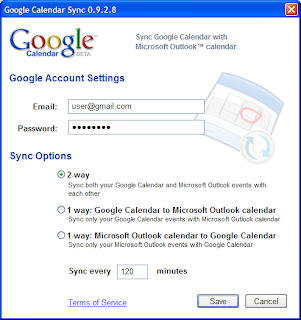


In the Settings window, enter your email address and password and select the Sync Option you prefer. For more information on each Sync Option, please visit Google Calendar Sync: Options

You'll also be able to set the time interval for syncing to occur. Please keep in mind that 10 minutes is the minimum time interval allowed.

After the initial set-up, you can access the Google Calendar Sync Settings window again by double-clicking on the calendar icon in your Windows System Tray.

from the offical web site of Google http://www.google.com/support/calendar/bin/answer.py?answer=89955